Nexora Labs · Photoshop Plugin · v0.4.35
AI Connector
for Photoshop.
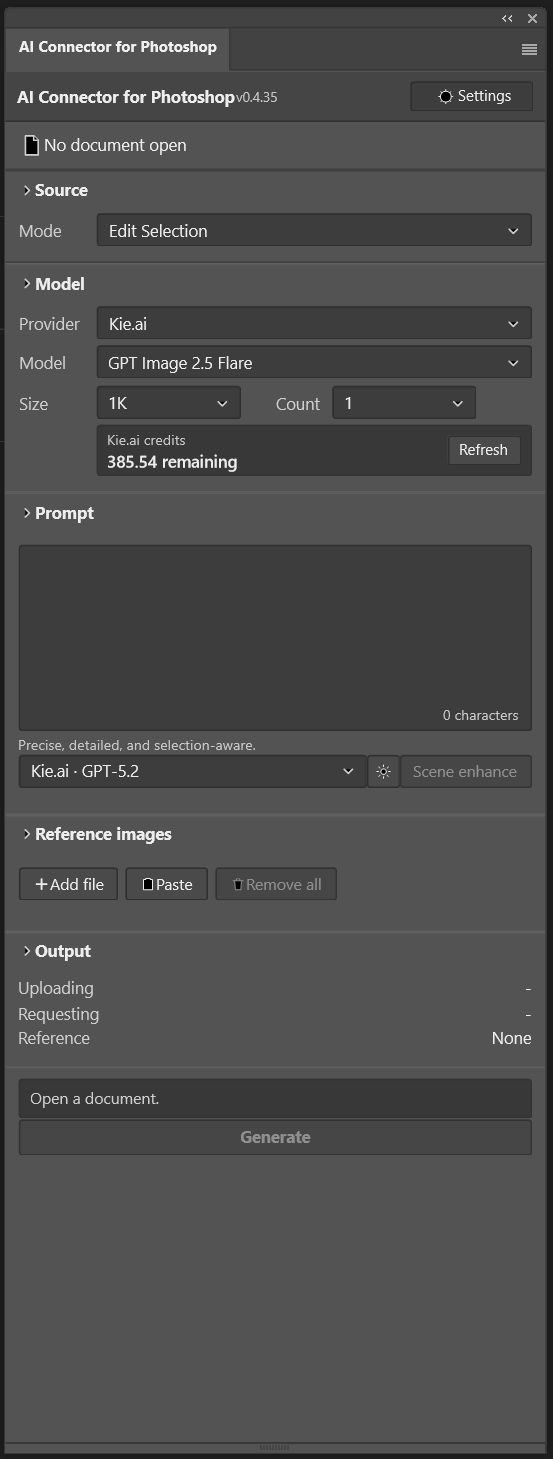
Generate and edit images with Google Gemini, OpenAI, and Kie.ai — right inside Photoshop. Every result lands as a non-destructive Smart Object. Bring your own API key.
Get in touch →Windows · Photoshop 2024+
What it does
Everything you need, without leaving Photoshop.
Four ways to work
Generate a brand-new image, or edit your selection, the active layer, or the full visible composite — all from one panel.
Three providers, one panel
Connect Google Gemini, OpenAI, or Kie.ai. A single Kie.ai key unlocks many models and shows your live credit balance.
Top image models
GPT Image 2, Nano Banana 2, Nano Banana 2 Lite, and Nano Banana Pro — with output up to 4K where supported.
Prompt Assistant
Sharpen any prompt with Gemini 2.5 Flash, Claude Fable 5, or GPT-5.2, guided by your own reusable System Prompt.
Non-destructive Smart Objects
Every result imports as a named Smart Object, aligned to your selection. Generate 1–4 variations at once; originals are never touched.
Private by design
Edit Selection sends only the selected pixels. Your API keys stay in Photoshop’s secure storage on your own machine.
FAQ
Questions, answered.
Do I need my own API key?
Yes. The plugin connects to your own Google Gemini, OpenAI, or Kie.ai account, so you pay the provider directly for what you use and your keys never leave your computer.
What do I need to run it?
Adobe Photoshop 25.0 or newer (2024+), Adobe Creative Cloud Desktop to install the plugin, an internet connection for the AI models, and an API key for your chosen provider. RGB documents are required for image-editing modes.
How is it installed?
It ships as a .ccx package. Double-click it and Adobe Creative Cloud Desktop installs it; then open it from Photoshop’s Plugins menu. No developer tools needed.
Is my image data private?
In Edit Selection mode, only the selected pixels are sent to the provider you choose — never the whole document. Edit Visible Composite (which sends the full document) is opt-in and asks for confirmation. Your original layers are never modified.